Lost Your Lead Data? Here's How Ritridata Data Recovery Can Help
If you've ever been knee-deep in a marketing campaign and suddenly couldn't locate a contacts export or a lead report you know you had saved, you already understand why this topic matters more than most people give it credit for.
Marketing teams handle enormous volumes of data every single day. Lead lists, CRM exports, performance dashboards, follow-up trackers, email sequence analytics, the list is long. And a significant portion of this data still lives on local machines, portable drives, or storage devices that don't always have a reliable backup system behind them. One wrong click, an unexpected system crash, or an accidental format job, and hours, sometimes months of carefully collected information can disappear entirely.
That's exactly the problem a tool like Ritridata Data Recovery is built to solve.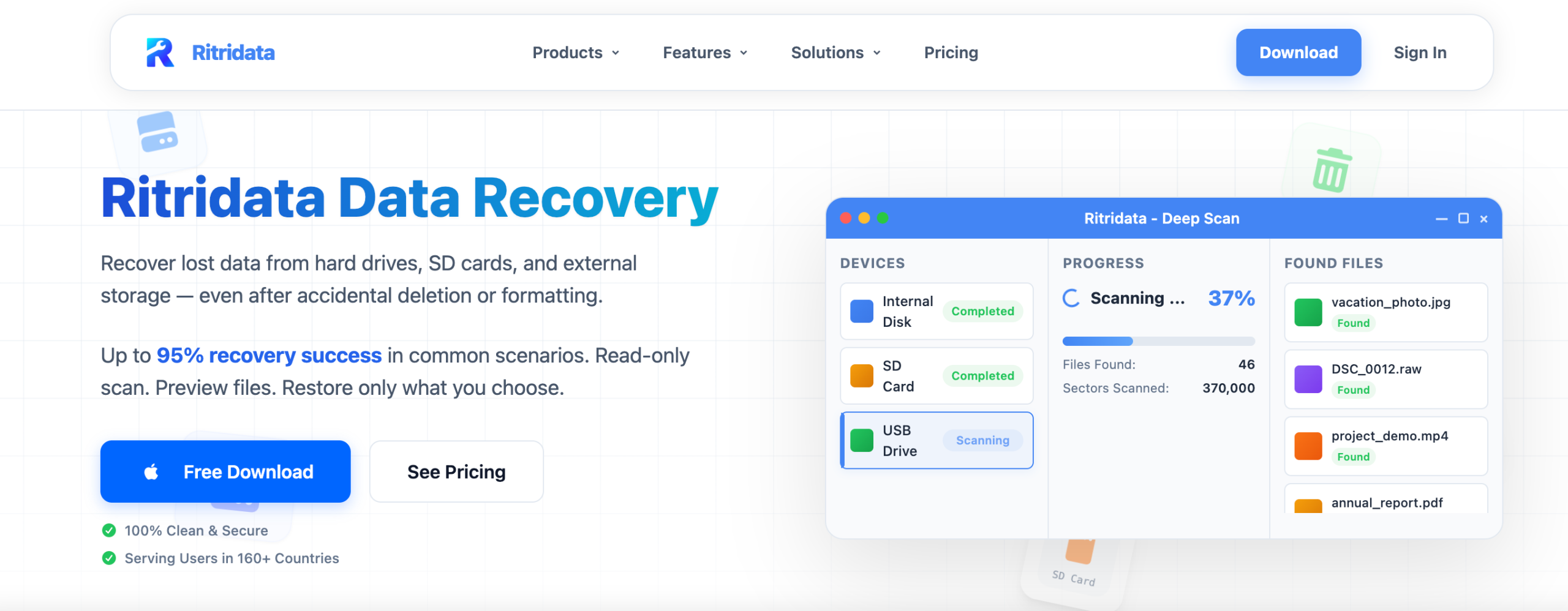
What Is Ritridata Data Recovery?
Ritridata is a file recovery software designed for real-world situations where important data goes missing without warning. Whether it's a hard drive that suddenly stopped responding, a USB drive that got accidentally wiped before a presentation, or files that were deleted and bypassed the recycle bin entirely, the software is engineered to scan deep and recover what's been lost.
Importantly, it's not designed exclusively for IT professionals. The interface is straightforward enough that a marketer or business owner, without any technical background whatsoever, can navigate the recovery process independently.
Key Features Worth Knowing
Ritridata supports over 1,000 file formats and claims recovery from more than 2,000 types of storage devices, which makes it versatile enough for virtually any scenario a business user might encounter.
For lead generation and marketing teams specifically, that kind of coverage means the software can potentially recover:
- Excel and CSV files containing lead contact data
- CRM export files and customer databases
- Campaign analytics reports and performance summaries
- PowerPoint presentations and proposal documents
- Email marketing reports and conversion tracking files
The software also comes equipped with a deep scan mode, which goes several layers deeper than a standard scan. This is particularly useful in situations where a basic recovery attempt comes up empty, perhaps because the drive was reformatted or the data has been partially overwritten.
Another practical feature is the file preview function, which lets users examine recoverable files before committing to the restoration. This saves time and avoids cluttering a drive with irrelevant recovered data.
Compatibility-wise, Ritridata works on Windows systems and supports HDDs, SSDs, USB flash drives, and SD cards.
The 3 Steps for the Recovery Process
The recovery workflow is intentionally simple, broken into three clear stages.
Step 1: Select the Storage Location

You begin by pointing the software toward the location where the data was lost. This might be your internal hard drive, an external disk, a USB drive used for transferring client files, or an SD card. Once selected, Ritridata prepares the device for scanning.
Step 2: Run the Scan
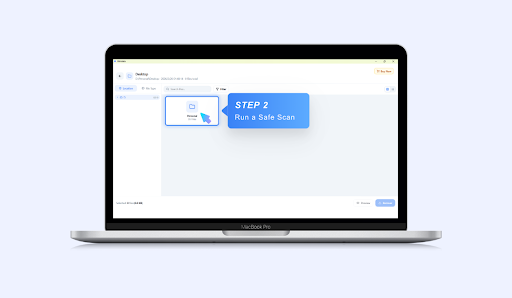
This is where the real work happens. Ritridata scans the selected storage device for fragments of deleted or lost file data that often still physically reside on a drive even after it appears to have been erased. Users can monitor the scanning progress in real time, which is a small but reassuring touch that gives you visibility into what the software is actually doing.
Step 3: Preview and Restore

Once the scan completes, the software presents a list of recoverable files. The preview feature lets you confirm exactly what you're looking at before recovering anything. When you've identified the files you need, you restore them to a secure location, ideally a different drive from the one you're recovering from, to avoid overwriting anything.
Why Lead Generation Teams Can't Afford to Overlook This
Lead generation is expensive in every sense of the word. The time invested in building a qualified contact list, the ad spend behind campaigns, and the hours of segmenting and qualifying prospects, none of that can be recreated overnight if something goes wrong with your data.
Losing a lead database mid-campaign doesn't just mean lost time. It can mean missed revenue targets, broken sales workflows, and a frustrating conversation with whoever manages the pipeline. For B2B businesses, especially, where a single lead can represent thousands of dollars in potential revenue, the stakes are particularly high.
Data loss scenarios that are more common than you'd think include:
- Accidentally deleting a master lead list while cleaning up a storage drive
- A corrupted CRM export after a software crash or failed sync
- A formatted USB drive that contained the only copy of a campaign report
- A laptop hard drive failure wiped out months of outreach history
In any of these situations, having a recovery tool available can mean the difference between a temporary disruption and a permanent loss.
Preventive Habits That Reduce the Risk
Recovery tools are genuinely useful, but they're a last resort, not a substitute for good data hygiene. Here are the habits that should come before you ever need to run a recovery scan:
Back up regularly. CRM data, lead databases, and campaign reports should all have scheduled backups. Weekly at a minimum; daily if the volume justifies it.
Use cloud storage. Platforms like Google Drive, Dropbox, or OneDrive add a critical layer of protection that local storage alone simply cannot match. If a local drive fails, cloud-stored files remain accessible.
Organize files deliberately. Disorganized storage files scattered across desktops, downloads folders, and unnamed drives are one of the most common reasons files get accidentally deleted. A clean file structure reduces that risk significantly.
Train your team. A large proportion of business data loss is caused by human error. Even basic training on proper file management, storage naming conventions, and backup procedures can dramatically reduce the chances of something going wrong.
Audit your storage devices. USB drives and SD cards are easy to lose, damage, or accidentally format. Knowing what's on them and keeping backups of anything critical is a simple habit worth building.
Final Thoughts
Ritridata Data Recovery won't win awards for flashiness, but that's not the point. It's a practical, dependable tool that does exactly what it promises: recover files that most users assume are gone for good.
For marketing teams and lead generation professionals who depend on accurate, up-to-date data to drive pipeline activity and measure campaign performance, having a capable recovery option available is simply smart risk management. The cost of not having it measured in lost leads, missed deals, and wasted campaign effort far outweighs the effort of keeping it in your toolkit.
Think of it the same way you'd think about insurance. You'd rather never need it. But when you do, nothing else will do.
About the Author