Lead Capture Form Builder vs Standard Forms For Leads
There’s an invisible revenue leak many businesses don’t realize they have.
And it’s hiding in the forms they use.
Every time someone clicks on your contact form, event registration, or starts an application, they’re making a small commitment to continue. But standard forms can make that commitment feel heavier than necessary.
Especially if they have long layouts, irrelevant questions, and clunky experiences.
This creates user friction at the moment conversion is supposed to happen. When your forms aren’t built to guide leads forward, users hesitate, then abandon the form. Without a lead-gen form builder, almost-leads disappear without a trace.
Lead capture form builders are designed around how people naturally behave online. They personalize the user experience, help reduce resistance, and keep prospects moving instead of stalling.
In this guide, you’ll see what separates them from standard forms. (And why that difference directly affects how many leads your business keeps or loses.)
What is a lead capture form builder?
A lead capture form builder is a tool you use to create forms designed to increase lead conversions. With this no-code form builder, you can build optimized forms and decide how form responses get scored and processed.
You can also customize each form’s look and feel.
Here’s what a lead capture form builder might look like: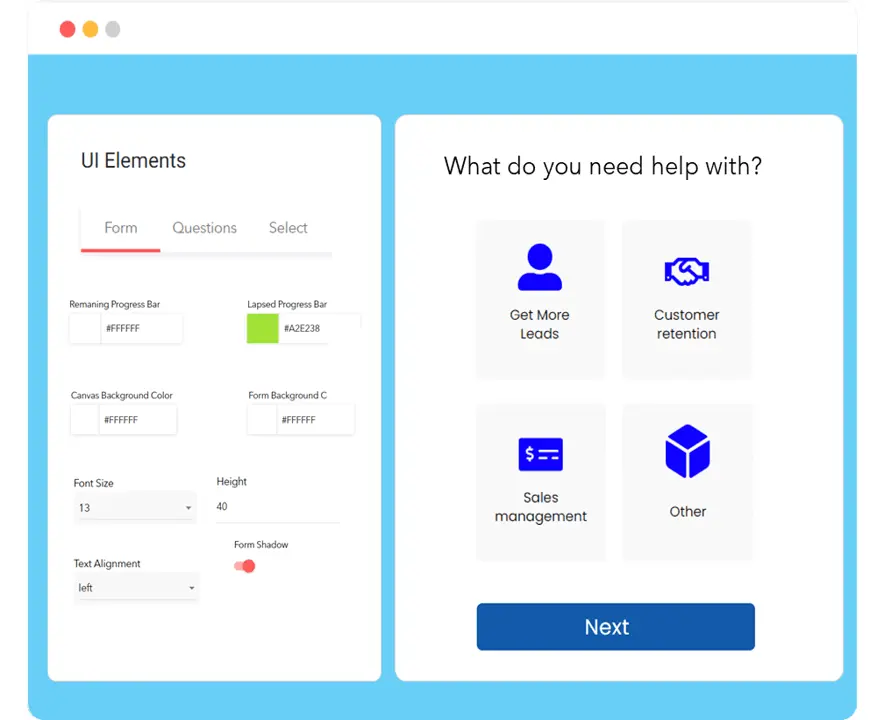 (Image Source)
And here’s what a published form might look like after building it with a lead capture form builder:

This form starts by asking the user’s loan amount and monthly income, and then uses conditional logic to show follow-up questions or skip irrelevant steps based on their answers.
Only qualified applicants reach the final submission, and everyone else sees tailored next steps or an appropriate ending screen.
What is a standard form builder?
A standard form builder is pretty basic. Some builders, like Google Forms, offer simple form templates you can work off of — or you can build your own custom forms.
Templates might include: A basic quiz template, a simple contact form, and a survey template.
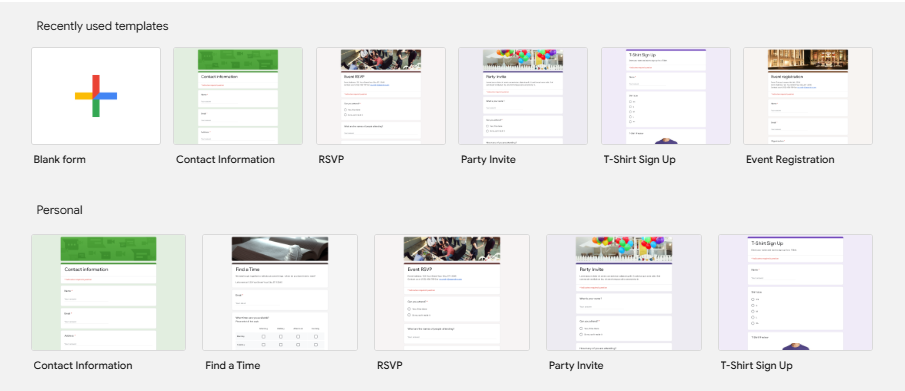
They’re mostly easy to use and intuitive, but they’re not optimized for lead generation.
At most, you can add contact fields to collect lead data, like names, phone numbers, and email addresses. But there are no built-in integrations or features that help you qualify leads, generate more leads, or reduce abandonment.
I’ll explain this more in the next section.
How is a lead capture form builder different from a standard form?
A lead-capture form builder is designed to turnlead-capture form builder is designed to turn visitors into qualified leads. And not with a basic contact form.
Instead of showing one long, static form, it guides people through multi-step flows that feel lighter and easier to complete. Conditional logic personalizes what each visitor sees, so they’re only answering relevant questions. This alone can reduce drop-off.
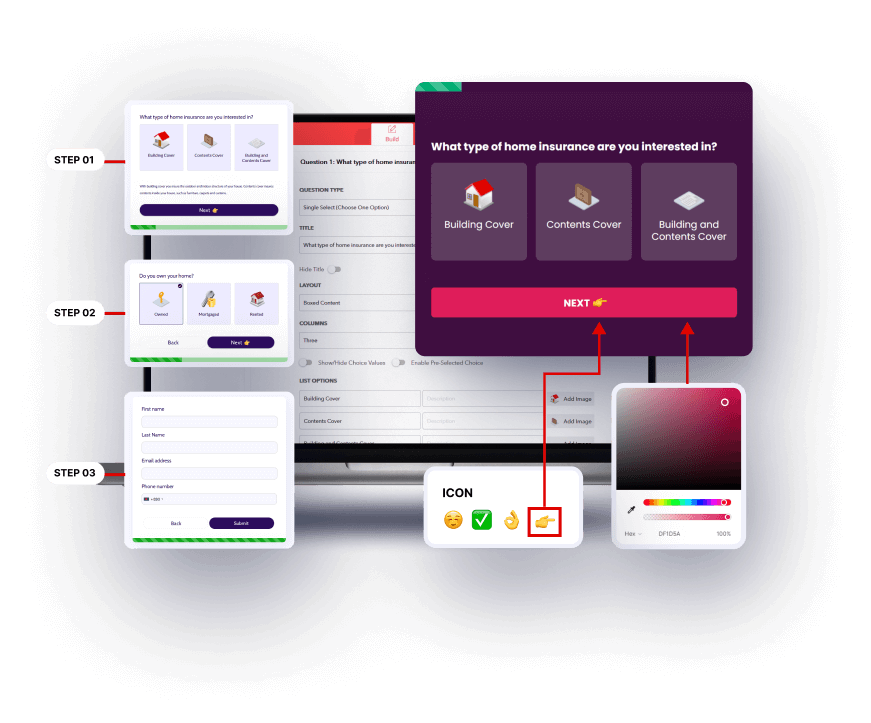
You also get built-in lead optimization tools. (Like partial lead capture so you don’t lose someone mid-form, A/B testing to improve performance, and analytics that show where people hesitate or quit.)
Integrations push data directly into your CRM or automation stack, so leads don’t sit idle.
TL;DR: A standard builder publishes a form. A lead capture builder actively works to improve completion rates, qualify submissions, and feed your pipeline.
If you’re looking for optimal lead generation, lead capture form builders are better for your marketing campaigns than standard builders.
Why your business is leaking leads with a standard form builder
Standard forms fail due to friction, abandonment, or missed opportunities you never see.
For example:
Long, static forms create instant resistance
A single wall of fields feels like work. Visitors may hesitate, skim, or abandon the form entirely. There’s no pacing, progression, or psychological momentum to keep them moving.
Everyone gets the same experience
Static forms ask every visitor the same questions, even when they’re irrelevant. That adds friction and makes the process feel tedious.
Personalized flows keep attention.
You lose people who don’t finish
If someone starts filling out a standard form and leaves, their data disappears. There’s no partial capture safety net. Every abandoned form is a potential lead slipping away.
No visibility into drop-off
Standard builders rarely show where people quit or what’s hurting completion rates. Without insights or testing tools, you’re guessing instead of optimizing.
Leads stall after submission
Manual workflows or weak integrations slow follow-up.
Delays reduce engagement while intent is still high.
TL;DR: Standard forms collect data when everything goes perfectly. Lead capture builders are built for real-world behavior (distraction, hesitation, and friction) so you keep the leads you’re already earning.
Does LeadGen App (now CliqForms) offer an online lead capture form builder?
Yes. And it’s built to do much more than collect names and email addresses.
CliqForms combines lead capture, conversion tools, and follow-up workflows into one system, so you’re not juggling multiple apps just to move a prospect forward.
You can design guided, step-based forms that feel lighter to complete, personalize the path with smart logic, and even save in-progress submissions (like contact information) so interested visitors don’t fully disappear halfway through.
Once a form is live, use our built-in testing and performance tracking to see where people engage and where they hesitate, so you can keep improving results. Flexible endings let you route visitors based on their answers, so you can qualify and respond faster.
Lead capture isn’t limited to a single page, either.
You can spin up conversion-focused landing pages, drop forms into any site, or use QR access to collect responses in real-world settings like events or in-person meetings.
The goal is to give you one place to capture interest, understand what prospects need, and act on it quickly — all with tools designed to increase completion rates and keep leads moving.
Want to see how this works? Watch the demo now.
Wrap up
Standard forms collect data.
Lead capture forms aim to convert visitors into qualified prospects.
If you want fewer abandoned form submissions and stronger lead flow, upgrading your forms is one of the simplest wins available. Start a free CliqForms trial and capture up to 5X more leads from your web pages.
Psst … Did you like this article?
Read this next: Why Your Lead Generation Success Is Creating Your Biggest Bottleneck.
FAQs about lead capture form builders
Do lead capture form builders improve mobile conversions?
Yes, they’re designed with mobile usability and speed in mind.
Are lead capture form builders hard for marketing teams to use?
Most lead-capture form builders are user-friendly, with drag-and-drop interfaces that require no coding. And there are all types of forms you can create.
Can I track form abandonment with a lead capture form builder?
Yes, many provide detailed analytics showing where users drop off. Some also offer landing page visitor tracking.
Will using a lead capture form builder increase sales?
When implemented correctly in your sales funnel, a lead-capture form builder can help you capture contact details from best-fit leads and increase conversion rates.
Are form automation builders expensive?
Prices vary, but many affordable options exist. The ROI for automated forms and lead nurturing campaigns usually outweighs the cost if you set them up strategically.
Can I customize a lead capture form builder?
Yes, they offer customizable fields, designs, and conditional logic to fit your needs.
LeadGen App, now CliqForms, also has built-in lead scoring tools. You can set up your form to score your incoming leads based on the responses they’re providing.
About the Author