
Contact Sales
Contact Login
Leadgen App
  • Pricing
    • Subscriptions
    • Enterprise
  • Templates
    • Lead Capture Forms
    • Data Collection Forms
    • Contact Forms
    • Conditional Logic Forms
    • Calculator Forms
    • Lead Qualification Forms
    • Request Forms
  • Support
    • Help Center
    • Security
    • FAQ
    • Product Updates
  • Online Form Builder
    • Features
      • Multi Step Form Builder
      • Conditional Logic Form Builder
      • Form Fields
      • Partial Leads
      • Form Calculations/Scoring
      • AB Testing & Conversion Optimization
      • LeadProof
      • Lead Verification
        • Trustedform Certificates Integration
        • Contact State
    • Demo
    • Integrations
      • Google Analytics
      • Google Cloud
      • Event Tracking
      • Zapier
      • Webhooks
      • Trustedform Certificates Integration
      • Contact State
    • Customer Experiences
  • Free Trial
  • Watch Demo
Select Page

Suggestions and Feedback

  • Submit New Feature Request

Build Forms

  • How to Capture UTM Parameters for Accurate Campaign Tracking
  • What Are The Steps To Create A LeadGen Form?
  • How To Add Google ReCAPTCHA On Your LeadGen Forms?
  • How Can I Centralize The Question Title And Description Text In Forms?
  • How Do I Start Creating Forms In LeadGen App?
  • How To Create A Multi-Step Form?
  • How To Ask For Date Of Birth In A LeadGen Form?
  • How Can I Add Images And Logos To My Forms?
  • What Can I Do To Increase Lead Quality And Avoid Spam Enquiries?
  • How Can I Add A Summary Step For Users To Review Their Answers Before Submitting The Form?
  • How Can I Randomize The Order Of Options In Multiple Choice Questions?
  • How Can I Use Google Powered Address Autocomplete In LeadGen Forms?
  • What is Auto Navigation in multi step forms?
  • Blocking Custom Email Formats: A Simple Yet Effective Way to Manage Your Inbox

Lead Notifications

  • How Can I Remove LeadGen App Branding In Email Notifications?
  • How Can I Set-Up Email Notifications For New Leads?
  • What Can I Do If I Don’t Receive Email Notifications?
  • My Lead Notification Email Land In Spam Inbox. How Can I Resolve This?
  • My Emails Land In Updates, Promotion Or Other Gmail Tabs. How Can I Get Them To My Inbox?
  • How Does The Reply-To Header Setting In Email Notifications Work?

Conversion Optimization/Analytics

  • What Are Partial Lead Entries?
  • What Metrics Can I See To Analyze My Form Results?
  • How Can I A/B Test My Form Variants?
  • Form Events With Script Execution In LeadGen Forms

Form Design

  • How To Customize Multiple Choice Questions?
  • How Can I Use Themes To Save My Form Branding?
  • How Can I Customize The Continue And Submit Buttons?
  • Form Design Guide: How Can I Change The Design Of LeadGen Forms?
  • How can I change the form background color?
  • How Can I Make The Form Background Transparent?
  • How Can I Change The Form Width?
  • How Can I Change The Form Height?
  • How Can I Change The Form Internal Spacing/Padding?
  • Can All Form Steps To Have A Consistent Height?
  • How Can I Customize The Form Progress Bar?
  • How Can I Change The Font Size/Colors?
  • How Can I Change The Border Radius Of Elements In The Form (Form Design, Buttons, Etc.)?
  • How Can I Upload Images And Add Textboxes To Forms?
  • How Can I Add Image/Icons To Choice Questions?
  • How can I use radio buttons in questions?
  • What is the form fade-in effect?
  • How Can I Change The Background Color Of My Form?
  • How To Change The Dropdown Text Color?
  • Create A Form Ending For Unqualified Leads

FAQ

  • Frequently asked questions

Lead Management

  • How can I export my leads into a spreadsheet?
  • Where can I find my leads?
  • How can I delete leads?
  • Partial Lead Submissions

LeadProof

  • How can I use LeadProof on my website?

My Account

  • How to cancel, pause, or resume your plan
  • How can I update my bank/card details?

Templates

  • Can I edit a form template?

GDPR Compliance

  • Do you provide a GDPR Data Processing Agreement?
  • How can I use the GDPR Question Type?

Embed Forms

  • How can I fix forms that are not loading?
  • How to embed forms in Wix
  • How to embed forms into WordPress (Divi Theme)
  • How to embed forms into Leadpages
  • How to embed forms in Unbounce
  • How to embed forms in Webflow
  • How to embed forms in WordPress (Gutenberg Editor)
  • My forms load slowly. How can I improve load time?
  • The form doesn’t look good on mobile. How can I improve the responsiveness?
  • How can I change the sizing of the form?
  • How to embed forms in Squarespace
  • How can I embed LeadGen forms (Full Guide)
  • How does the Geolocation feature work?
  • How can I embed LeadGen forms in Clickfunnels?

Thank-You Screen

  • Answer Piping
  • Source URL vs Source Domain – Visitor-Based Form Endings
  • How to connect forms to Thank-you pages/messages
  • Multiple Endings to a Form
  • How can I post form data to the Thank-you page URL?
  • How can I append form data to the Thank-You URL?

Services

  • Do you offer Form Design Services?

Conditional Forms

  • How to create conditional logic forms?

Calculator Forms

  • How to build a calculator form?

Integrations

  • Integration guide: Connect LeadGen App via Zapier
  • Integrations Guide: How to integrate LeadGen via Webhooks
  • What type of integrations does LeadGen App support?
  • Google Analytics Integration Guide
  • Is it possible to track LeadGen conversions inside Unbounce?
  • Contact State Integration guide
  • Trustedform Integration

Landing Page Builder

  • Editing Your Landing Page
  • Landing Page Prompts

Advanced Guides

  • Integrating Zapier via LeadGen
  • How To Use URL Parameters For Form Prefilling
View Categories
  • Home
  • Help Center
  • Advanced Guides
  • Integrating Zapier via LeadGen

Integrating Zapier via LeadGen

How to integrate your forms to Zapier via LeadGen 

With Zapier integration, you can automate your workflows by connecting your LeadGen forms with thousands of apps—like Gmail, Slack, HubSpot, or Google Sheets—in just a few clicks.

Follow these simple steps to set up the integration:

Log in to your LeadGen account. Go to the forms section and select the form you want to integrate.

Forms section

Go to Integrations and click on the Add integration button.
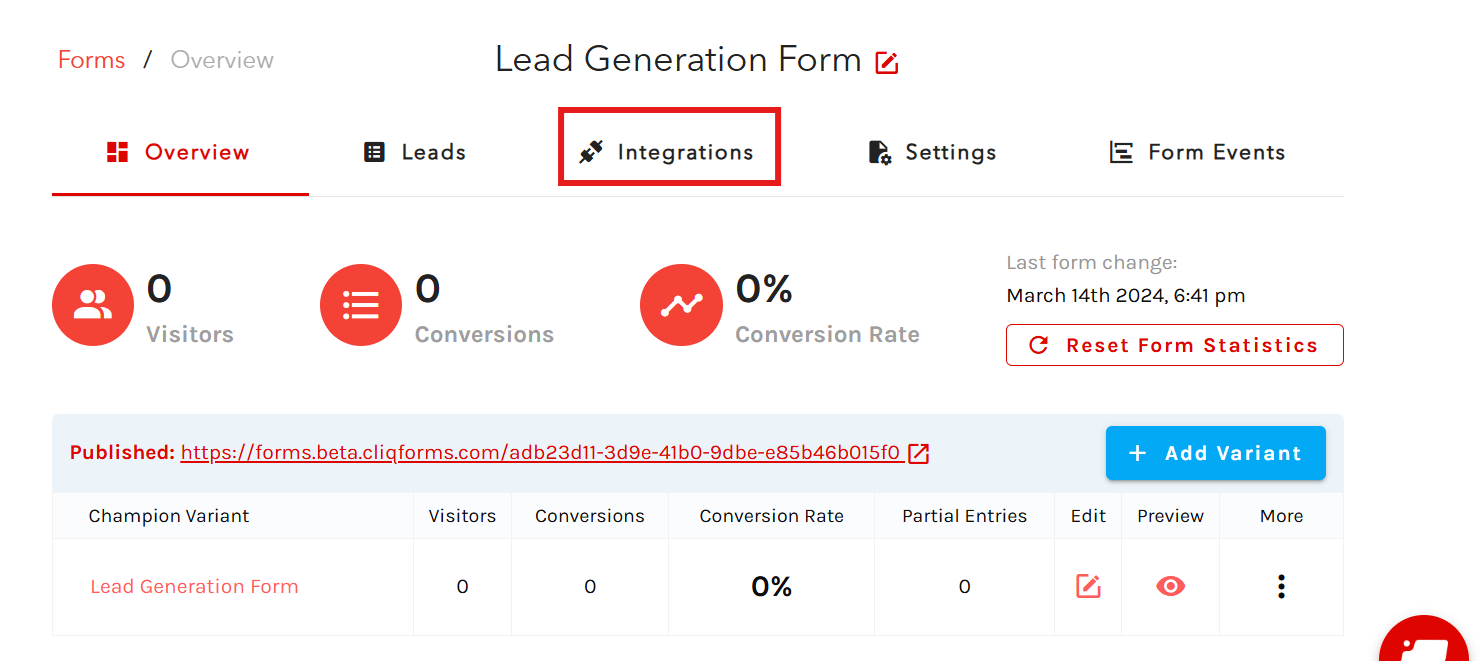
Integration button

Now, click on Zapier to start the integration.
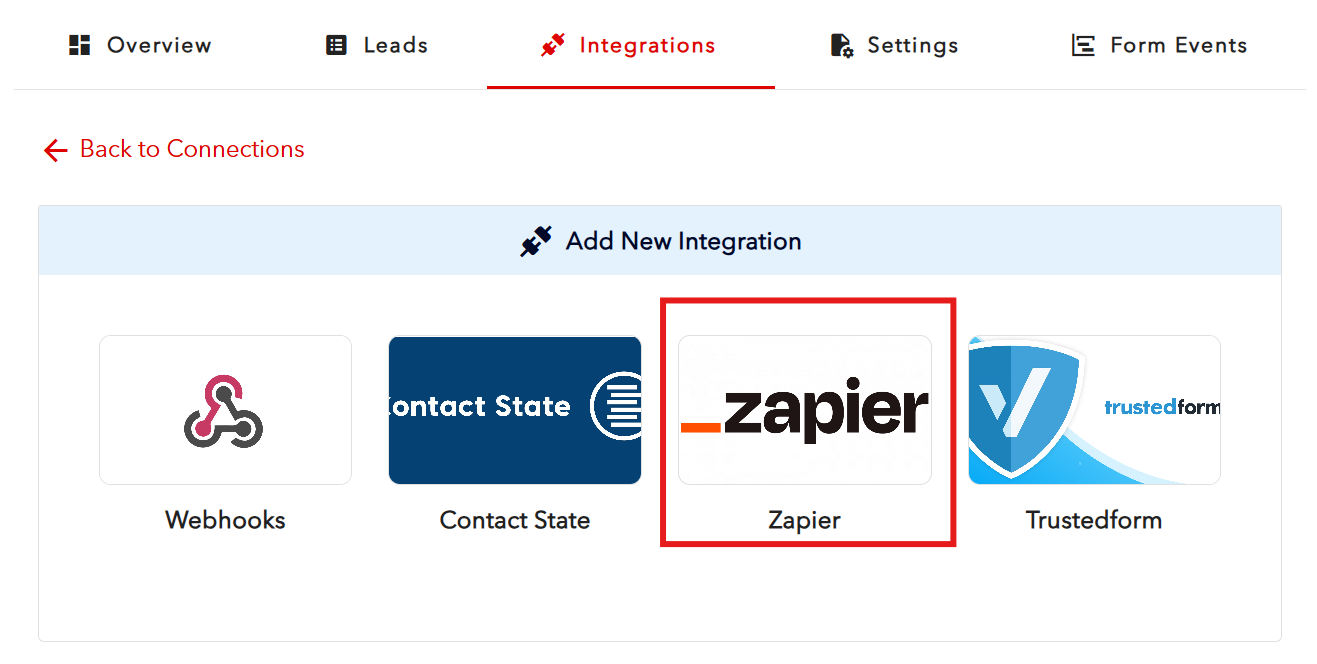
Zapier integration

 A new window will open, prompting you to log in to your Zapier account.
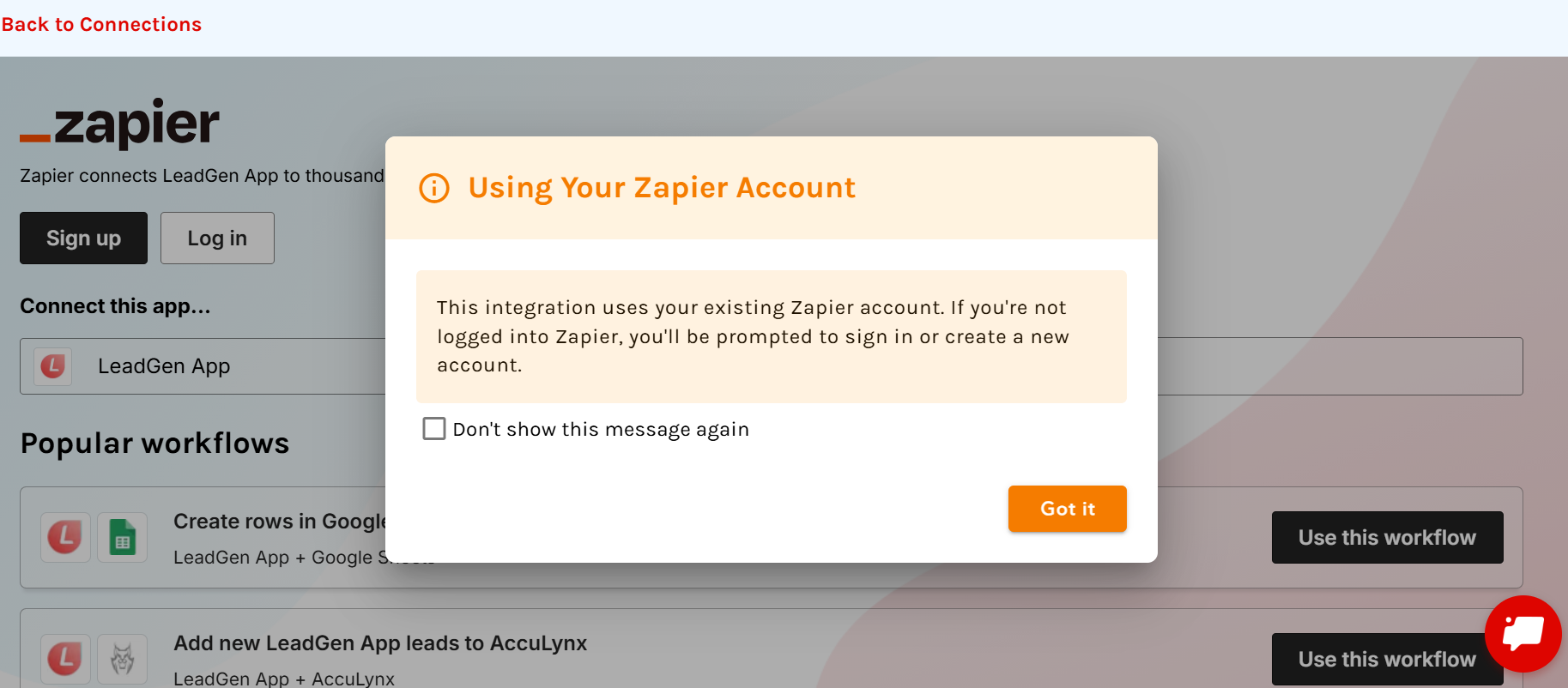
New prompt window

If you already have a Zapier account and are logged in in another tab of your browser, you’ll be logged in automatically and can start connecting your apps.

If you already have a Zapier account and are not logged in in any other tab of your browser, you can log in using the Log In button.

If you’re new to Zapier: Click Sign Up on the same window to create your Zapier account — it only takes a minute.

Once logged in, you’re ready to start creating workflows

Select LeadGen App as your trigger app.
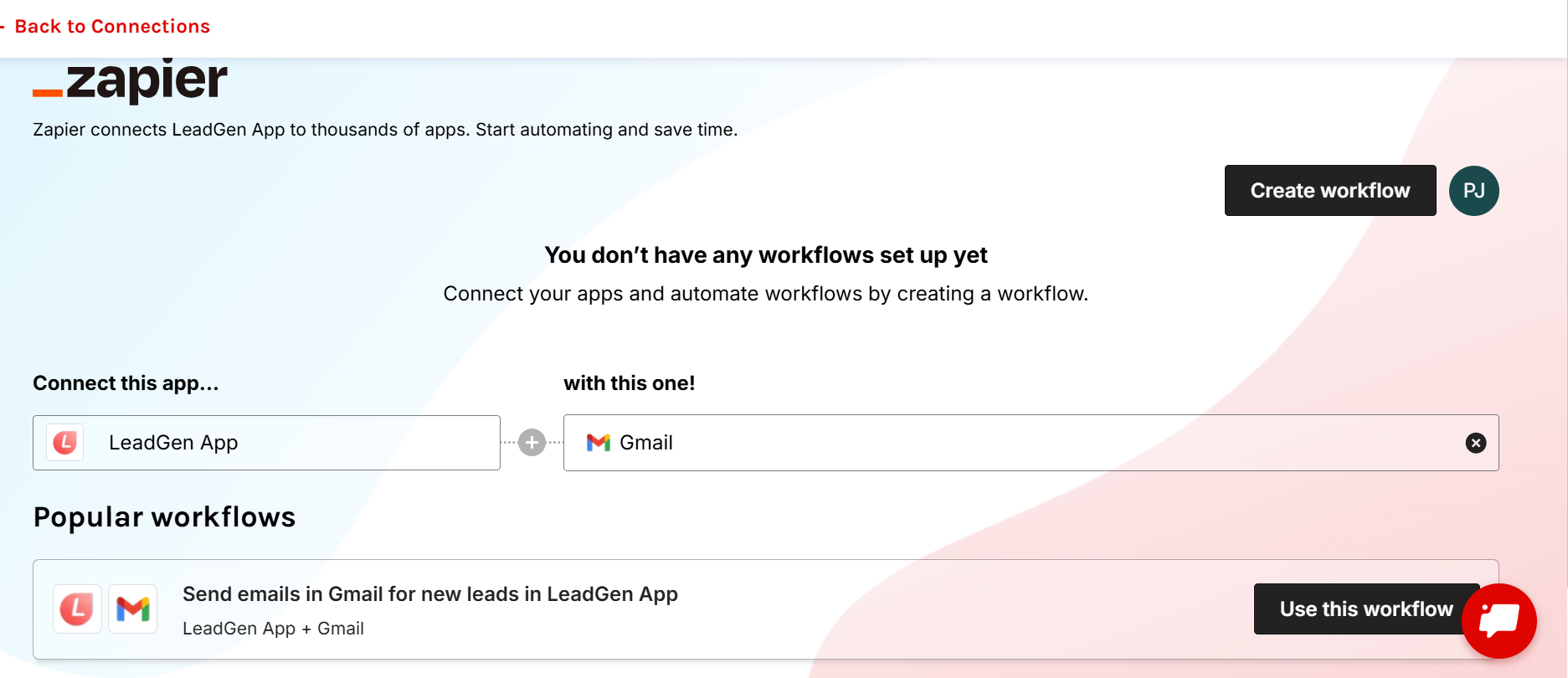
Select LeadGen App as your trigger app

Choose the app you want to connect with (for example, Gmail, Slack, or Google Sheets).

Follow the prompts to finish setting up your automation (Zap).

That’s it!

Your LeadGen form is now connected to Zapier. Every time a new lead is submitted, your chosen app will automatically receive the data—no manual work needed!

Tip: You can create multiple Zaps for different forms and apps to automate your marketing, notifications, and lead management tasks effortlessly.

What are your feelings?
Still stuck? How can we help?

How can we help?

Updated on December 5, 2025
How To Use URL Parameters For Form Prefilling

Powered by BetterDocs

Table of Contents
  • How to integrate your forms to Zapier via LeadGen 
LeadGen App
🟢 System Status
The Platform
  • Form Builder
  • Multi Step Form Builder
  • Conditional Logic Form Builder
  • Pricing
  • TrustedForm
  • Contact State
  • A/B Testing
  • Features
  • Embed Forms
Industries
  • Marketing Agencies
  • Real Estate
  • Mortgage
  • Insurance
  • Car Detailing
Form Types
  • Types of Forms
  • Multi Step Forms
  • Application Forms
  • Registration Forms
  • Request Forms
  • Contact Forms
  • Data Collection Forms
  • Conditional Forms
  • Landing Page Forms
  • Consent Forms
Resources
  • Help Center
  • FAQ
  • Blog
  • Templates
  • Form Fields
  • Security
  • Tools
  • Blog Quality Policy
About
  • Contact Us
  • Customer Stories
  • About
  • Product News
  • Advertise with Us

© Copyright by CLIQ ONLINE PTY LTD hello@leadgenapp.io

  • Cookies
  • Terms
  • Privacy